Thread Rating:
  • 0 Vote(s) - 0 Average
  • 1
  • 2
  • 3
  • 4
  • 5
Waiting in Day mode before launching an alarm
#1
Hello, and first of all, scuse me for my bad english.

I need a little help in configurating my system.
This is what i need to do:

When i arm in \'Day mode\', i want when someone open a window, the system gives a \'warning message\' and waits for 20 seconds allowing to disarm. If you don\'t enter the sign-in code and disarm, the system give an intruder alarm.

How can i set it?

Thank you very much


Ema from Italy
Reply

#2
What is the difference from \'Perimeter\' and \'Alert\'?
Reply

#3
The default Response \"Entry Delay in Day Mode\" will work

If SecurityMode = DayMode Then
    Start EntryDelay
End If

Use this as the Zone Response for the Window
When the window is opened in Day Mode, it will start an entry delay, like the entry door and beep so you know you have to disarm


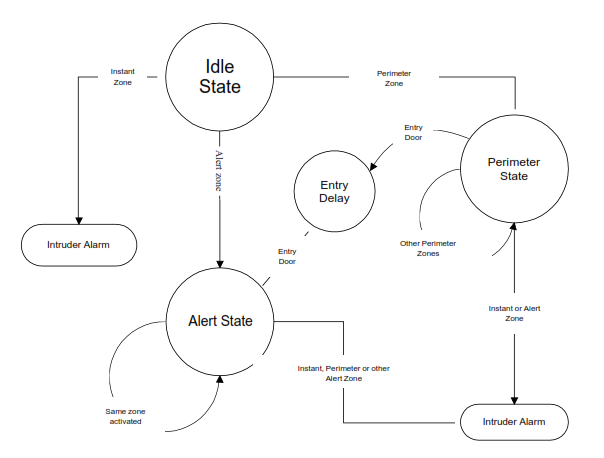
A Perimeter zone followed by Alert Zone  (or the reverse) will cause an intruder alarm

An Alert Zone followed by a different alert zone will cause an intruder alarm

Perimeter zones are meant for the perimeter area (or window)
Alert zones are meant for internal PIRs

So someone cross the perimeter will only cause an alarm if an Alert zone is detected

The flowchart shows how the system operates


Reply

#4
Ok, i have understood.

So, when the window will be open, it will start an entry delay. But in \'Zone Types properties\', how must i set the \'Day mode\' alarm for window\'s zone? \'Disabled\' or \'Immediate\'?
Reply

#5
Do not change the zone type, leave it as what it was
Reply

#6
The alarm in \"Day mode\" for the zone type of these windows, must be \'Disabled\' or \'Immediate\'?

Reply

#7
Ok, after trying some options, i have understood myself i need to set \'Immediate\' and the new configuration now works.

But testing this, i have seen a strange behaviour. I need to explain this showing my \'log\' file and my configuration file.
Can you please tell me an e-mail where i can send these?

Thank you very much.


Reply

#8
Support@cytech.biz please send files
Reply


Forum Jump:


Users browsing this thread:
1 Guest(s)

Powered By MyBB, © 2002-2026 Melroy van den Berg.